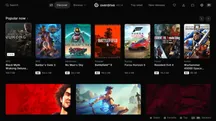
Playing Xbox games on a Sony console has ceased to be an emulation experiment, becoming instead something closer to a service. Independent developer RafaelNGP has published PSBox Cloud Gaming, an unofficial Xbox Cloud Gaming client that runs natively on PS5 with homebrew enabled, provided it is launched through a launcher like ShadowMountPlus.
The name says it all: instead of moving the Microsoft catalog inside the console, what it does is bring it via streaming. That simplifies things a lot, because it doesn’t depend on the raw power of the hardware or instruction translation, but rather on the connection and Microsoft’s infrastructure.
What PSBox Cloud Gaming Offers
The application relies on the player’s account, not additional hardware. Login is resolved by entering a code at microsoft.com/link, and to use it you still need a Game Pass Ultimate subscription, which provides access to the cloud catalog.
From there, the client attempts to make the experience as close as possible to that of an Xbox console:
- The DualSense acts as an Xbox controller, with vibration included, and the latest build adds voice chat through the controller’s own microphone.
- Streams are broadcast at 1080p and 60 fps by default, with 720p for slower connections and an experimental 1440p mode where Microsoft offers it.
- The app can use the PS5 GPU to upscale the image up to 4K, with the option to choose between the AMD FSR 1 scaler and Anime4K.
That last point is the most curious aspect of the project: instead of leaving image processing to the remote server, it leverages the console’s silicon to refine what arrives over the network.
A Project That Advances Quickly, But With Limitations
The release pace is noteworthy. Version 0.5.0, which introduced 4K scaling, arrived on October 8th, and barely two days later version 0.9.5 appeared, adding the possibility of doing Remote Play to your own Xbox. In other words: you can not only play from the cloud, but also from the Microsoft console that the player has at home.
Not everything is perfect, and it’s worth knowing before installing it. Video is decoded in H.264 via CPU, so for now there is no HDR, and the bitrate stays around 10 and 12 Mbps at 1080p. Some early testers have reported macroblock artifacts, pink flares, and issues with DualSense vibration.
What Changes for the Player
PSBox is not for everyone: it requires a jailbroken PS5 and a running homebrew environment, in addition to the Game Pass Ultimate subscription. Those who meet these conditions find an uncommon way to access Microsoft’s catalog without buying an Xbox console, although supported by infrastructure they do not control.
And there is the underlying risk. As the developer himself acknowledges in project notes, Microsoft can change or block the services that the client relies on at any time. That makes PSBox a more fragile solution than an official launch, and something to value as an extra, not as the main route to games.
The project also arrives during a very active phase of PS5 homebrew, after emulators capable of running Nintendo Switch games, loading PS2 discs via the PS5SX2 emulator, and even moving Halo 2 with an Xbox emulator. PSBox adds a different avenue, that of streaming, and leaves the decision where it has always been for this type of project: in the hands of the player who, with the hardware already unlocked and the subscription active, wants to squeeze the competitor’s catalog on their own console.